Every time you load a webpage, send an email, or stream a video, an intricate dance of underlying technologies takes place behind the scenes. These rules of engagement are known as network protocols—the standardized languages that allow devices to talk to one another across the internet.
To help break down how these foundational technologies operate, let’s take a closer look at 8 of the most popular network protocols, how they work, and where they are used.
1. HTTP (HyperText Transfer Protocol)
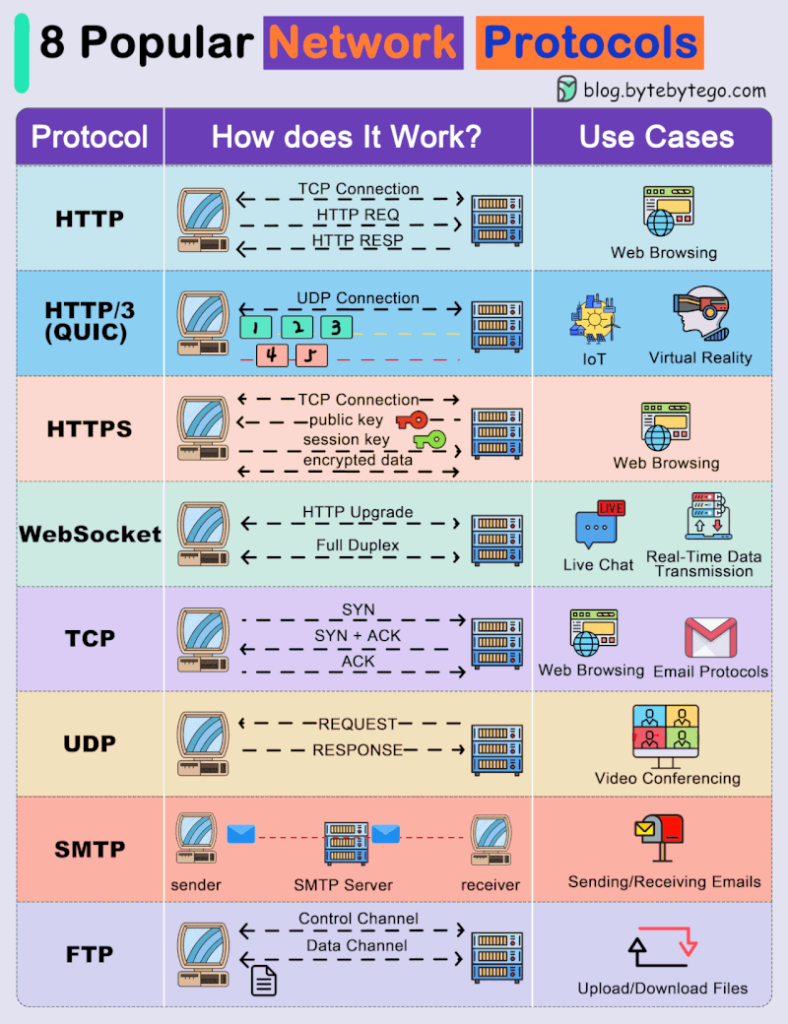
- How it works: Establishes a TCP connection between client and server, transmitting requests (
HTTP REQ) and returning responses (HTTP RESP). - Use Cases: Standard web browsing.1792398105341.jpg
2. HTTP/3 (QUIC)
- How it works: Replaces traditional TCP with a faster UDP connection model designed to minimize connection setup time and packet loss overhead.
- Use Cases: IoT (Internet of Things) and Virtual Reality (VR).1792398105341.jpg
3. HTTPS (HTTP Secure)
- How it works: Builds on standard HTTP by adding a security layer over TCP. It exchanges public and session keys to encrypt data in transit, ensuring privacy and integrity.
- Use Cases: Secure web browsing and online transactions.1792398105341.jpg
4. WebSocket
- How it works: Begins with an HTTP Upgrade request to establish a persistent, full-duplex communication channel over a single TCP connection.
- Use Cases: Live chat applications and real-time data streaming.1792398105341.jpg
5. TCP (Transmission Control Protocol)
- How it works: Uses a reliable three-way handshake (
SYN,SYN + ACK,ACK) to guarantee that packets are delivered accurately and in order. - Use Cases: Web browsing, email protocols, and file transfers.1792398105341.jpg
6. UDP (User Datagram Protocol)
- How it works: A connectionless protocol that sends requests and responses directly without a handshake,prioritizing speed over guaranteed packet delivery.
- Use Cases: Video conferencing and live streaming.1792398105341.jpg
7. SMTP (Simple Mail Transfer Protocol)
- How it works: Facilitates the reliable transfer of electronic mail from a sender’s client, through an SMTP server, and on to the receiver’s mail server.1792398105341.jpg
- Use Cases: Sending and receiving emails.1792398105341.jpg
8. FTP (File Transfer Protocol)
- How it works: Uses two separate channels—a Control Channel for managing commands and a Data Channel for transferring files between client and server.1792398105341.jpg
- Use Cases: Uploading and downloading files to and from web servers.1792398105341.jpg
Summary Checklist: Which Protocol Do You Need?
| Need / Scenario | Recommended Protocol | Primary Benefit |
|---|---|---|
| Secure Web Traffic | HTTPS1792398105341.jpg | End-to-end encryption for privacy |
| Real-time Live Chat | WebSocket1792398105341.jpg | Low-latency, full-duplex connection |
| Video Conferencing | UDP1792398105341.jpg | High speed, minimal latency for real-time media |
| Bulk File Management | FTP1792398105341.jpg | Dedicated control and data channels for large transfers |
Understanding these core protocols gives you a clearer window into the mechanics of the internet. Whether you’re building a web application, setting up an IoT network, or troubleshooting connectivity issues, knowing your protocols is an essential developer superpower!