Hypertext Transfer Protocol (HTTP) is the protocol used to transfer web pages. Your web browser connects to the web server and uses HTTP to request HTML pages, images, and other files. It also submits forms and uploads various files. Any time you browse the World Wide Web (WWW), you are using the HTTP protocol.
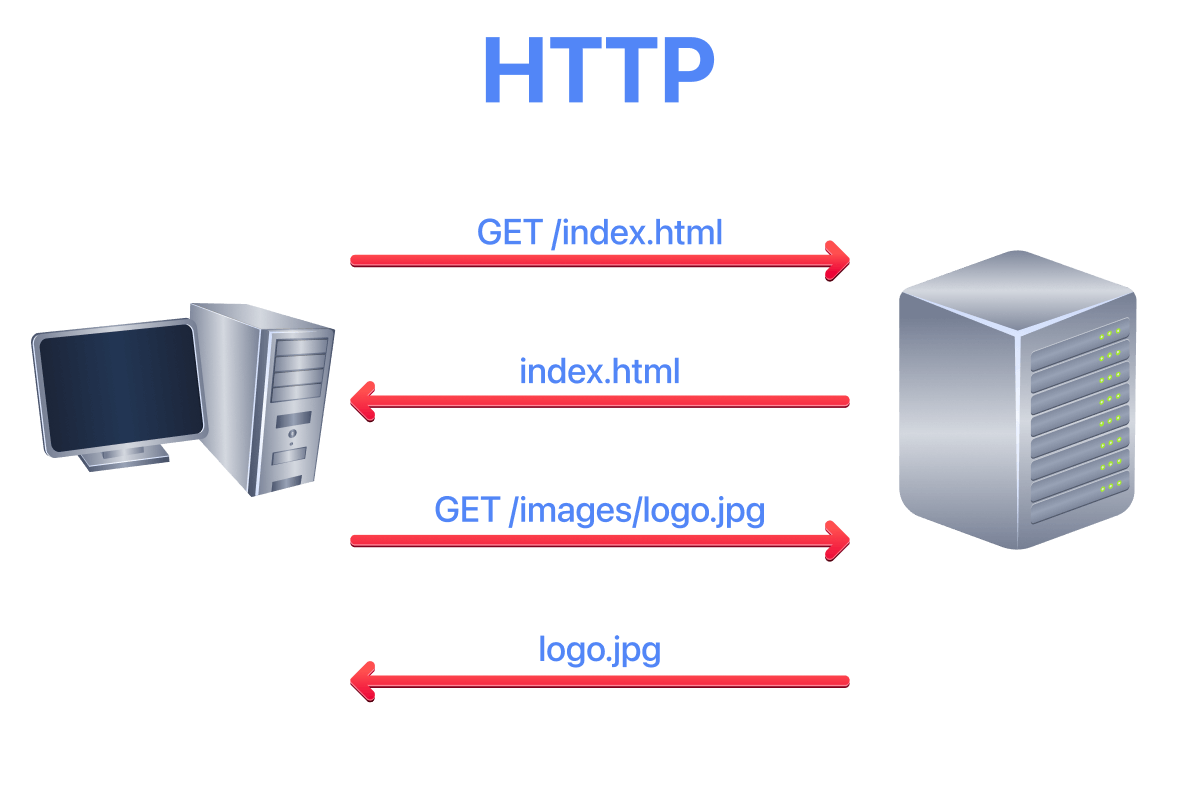
The image below shows a client requesting the HTML page index.html, which the web server provides. The client then requests an image, logo.jpg, and the web server sends it.
HTTP vs HTTPS
HTTP sends and receives data as cleartext (not encrypted). This means anyone with access to the network traffic can read the content being transferred, including sensitive information like login credentials and personal data.
Today, the vast majority of websites use HTTPS (HTTP Secure), which wraps HTTP inside TLS encryption. Modern browsers mark plain HTTP sites as “Not Secure”, and some features (like geolocation and camera access) are blocked entirely on non-HTTPS sites. However, understanding how HTTP works is still essential because:
- The HTTP commands and structure are identical whether using HTTP or HTTPS.
- You will encounter HTTP during internal penetration tests and on legacy systems.
- Understanding the protocol helps you identify and exploit web vulnerabilities.
- Tools like Burp Suite decrypt HTTPS traffic for analysis, showing you raw HTTP.
For this demonstration, plain HTTP is used so you can see exactly what is being transmitted.
Manually Sending HTTP Requests
Because HTTP is a cleartext protocol, you can use a simple tool such as Telnet (or Netcat) to communicate with a web server and act as a “web browser”. The key difference is that you need to input the HTTP-related commands instead of the web browser doing that for you.
In the following example, you will see how to request a page from a web server and discover the web server version. The Telnet client is used because Telnet is a simple protocol that uses cleartext for communication. The steps are as follows:
- Connect to port 80 using
telnet 10.64.144.252 80. - Type
GET /index.html HTTP/1.1to retrieve the pageindex.html, orGET / HTTP/1.1to retrieve the default page. - Provide a value for the host header, such as
host: telnet, and press the Enter/Return key twice.
In the console output below, the requested page is recovered along with information not usually displayed by the web browser. If the requested page is not found, the server returns error 404.
Pentester Terminal
pentester@TryHackMe$ telnet 10.64.144.252 80
Trying 10.64.144.252...
Connected to 10.64.144.252.
Escape character is '^]'.
GET /index.html HTTP/1.1
host: telnet

HTTP/1.1 200 OK
Server: nginx/1.18.0 (Ubuntu)
Date: Wed, 15 Sep 2021 08:56:20 GMT
Content-Type: text/html
Content-Length: 234
Last-Modified: Wed, 15 Sep 2021 08:53:59 GMT
Connection: keep-alive
ETag: "6141b4a7-ea"
Accept-Ranges: bytes

<!DOCTYPE html>
<html lang="en">
<head>
  <title>Welcome to my Web Server</title>
  <meta charset="UTF-8" />
  <meta name="viewport" content="width=device-width,initial-scale=1" />
</head>
<body>
  <h1>Coming Soon</h1>
</body>
</html>
The key input from the user is two lines: GET /index.html HTTP/1.1 followed by host: telnet.
Information Revealed in HTTP Headers
Notice the response headers in the example above. The Server: nginx/1.18.0 (Ubuntu) header reveals both the web server software and version, as well as the operating system. This information is valuable during reconnaissance because:
- Specific versions may have known vulnerabilities you can research.
- The OS information helps tailor further attacks.
- Even knowing the web server software narrows down potential attack vectors.
Security-conscious administrators often configure their servers to suppress or obscure this information. During a penetration test, finding detailed version information in headers is worth noting.
Web Servers and Clients
An HTTP server (web server) and an HTTP client (web browser) are required to use the HTTP protocol. The web server “serves” a specific set of files to the requesting web browser.
Popular choices for HTTP servers include:
- Nginx has become the most widely used web server on the internet, known for its performance and efficiency in handling concurrent connections. It is free and open-source.
- Apache remains extremely popular and powers a large portion of websites. It is highly configurable with a vast ecosystem of modules. It is also free and open-source.
- Internet Information Services (IIS) is Microsoft’s web server, commonly found in Windows enterprise environments. It requires a Windows Server licence.
Other notable web servers include LiteSpeed, Caddy (which has automatic HTTPS built in), and Node.js for JavaScript-based applications.
The most popular web browsers today are:
- Chrome by Google (dominant market share)
- Safari by Apple (default on macOS and iOS)
- Edge by Microsoft (Chromium-based, replaced Internet Explorer)
- Firefox by Mozilla (open-source, privacy-focused)
Web browsers are generally free to install and use. For penetration testing and security research, Firefox is often preferred because of its extensive developer tools and add-on ecosystem.
HTTP Protocol Versions
The example above uses HTTP/1.1, which has been the workhorse of the web for decades. However, newer versions exist.
HTTP/2 introduced multiplexing (multiple requests over a single connection), header compression, and server push. It is binary rather than text-based, making it harder to manually interact with using Telnet.
HTTP/3 uses QUIC (built on UDP) instead of TCP, offering improved performance, especially on unreliable networks. It is increasingly common on major websites.
For learning purposes and manual testing, HTTP/1.1 remains the most accessible because of its human-readable text format.