Have you ever wondered how your computer communicates with a web server, sends an email, or connects to a remote machine?
Behind almost every network communication, there is a fundamental concept: network ports.
Ports are essential components of computer networking. They allow devices to identify which application or service should receive incoming network traffic.
For anyone studying networking, ethical hacking, penetration testing, or cybersecurity, understanding common network ports is a fundamental skill.
In this article, we will explore 20 important network ports, their purposes, the protocols associated with them, and why they matter in cybersecurity.
1. What Are Network Ports?
A network port is a logical communication endpoint used by applications and services to exchange data over a network.
Think of an IP address as the address of a building and a port as the specific apartment where the communication needs to arrive.
For example:
- IP address: Identifies the destination device.
- Port number: Identifies the destination service.
- Protocol: Defines how the communication takes place.
TCP and UDP are the two most commonly used transport protocols.
TCP (Transmission Control Protocol) establishes a connection and provides reliable, ordered data delivery.
UDP (User Datagram Protocol) sends data without establishing a connection, making it useful for applications that prioritize speed and low overhead.
Port numbers range from 0 to 65535.
2. The 20 Most Important Network Ports
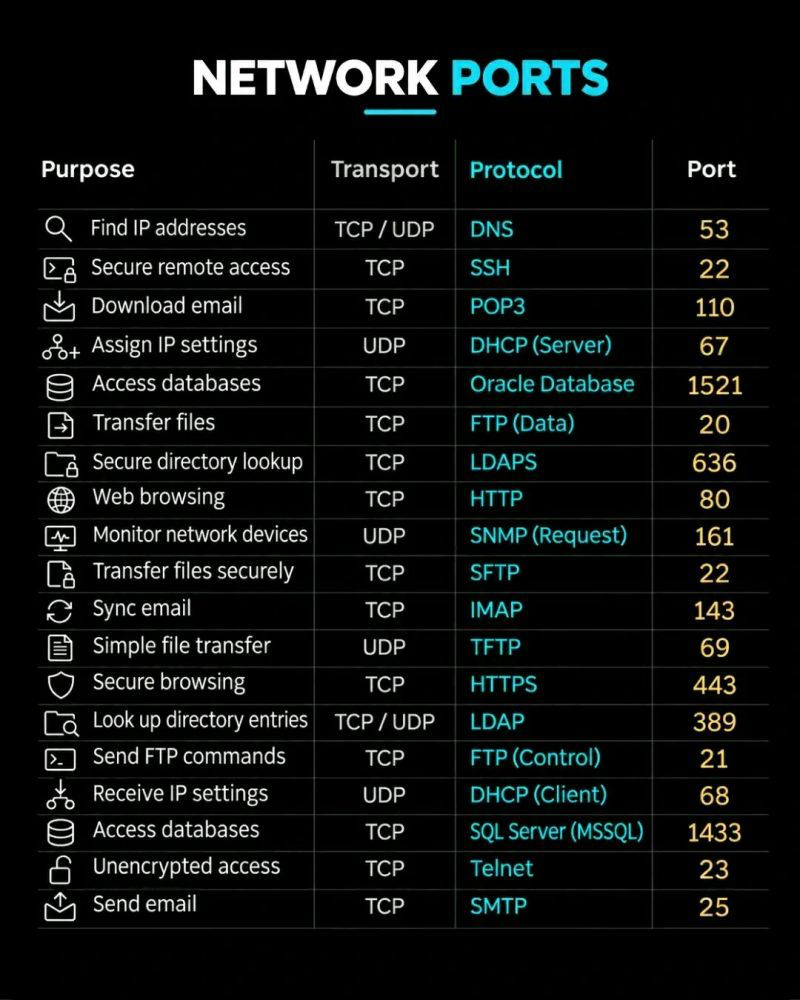
Here is a reference table of commonly used network ports that every beginner should recognize.
| Port | Protocol | Transport | Purpose |
|---|---|---|---|
| 20 | FTP Data | TCP | FTP data transfer in active mode |
| 21 | FTP Control | TCP | FTP command and control channel |
| 22 | SSH / SFTP | TCP | Secure remote access and file transfer |
| 23 | Telnet | TCP | Unencrypted remote access |
| 25 | SMTP | TCP | Sending email |
| 53 | DNS | TCP / UDP | Domain name resolution |
| 67 | DHCP Server | UDP | Assigning IP configurations |
| 68 | DHCP Client | UDP | Receiving IP configurations |
| 69 | TFTP | UDP | Simple file transfer |
| 80 | HTTP | TCP | Unencrypted web traffic |
| 110 | POP3 | TCP | Retrieving email |
| 143 | IMAP | TCP | Synchronizing and accessing email |
| 161 | SNMP | UDP | Network monitoring and management requests |
| 389 | LDAP | TCP / UDP | Directory services |
| 443 | HTTPS | TCP | Encrypted web traffic |
| 636 | LDAPS | TCP | Secure LDAP communication |
| 1521 | Oracle Database | TCP | Oracle database connections |
| 1433 | Microsoft SQL Server | TCP | SQL Server database connections |
Note: SFTP operates over SSH, normally using TCP port 22. FTP data transfer on port 20 applies to active FTP; passive FTP uses negotiated data ports.
3. Understanding the Most Important Ports
Let’s look at some of these services in more detail.
Port 22 – SSH (Secure Shell)
SSH provides secure remote access to Linux servers, network devices, and other systems.
Unlike Telnet, SSH encrypts communication between the client and server.
From a cybersecurity perspective, attackers may attempt brute-force attacks against SSH services using weak passwords or compromised credentials.
Example Nmap command:
nmap -p 22 <target-ip>Port 23 – Telnet
Telnet is an older remote administration protocol.
Its biggest security weakness is that it transmits information, including credentials, without encryption.
This makes intercepted traffic potentially readable by an attacker.
Modern environments should use SSH instead of Telnet.
Port 53 – DNS (Domain Name System)
DNS translates domain names into IP addresses.
For example:
When you visit:
www.google.comYour device uses DNS to discover the IP address associated with that domain.
DNS generally uses UDP port 53 for standard queries, but TCP port 53 is also important for larger responses and zone transfers.
Misconfigured DNS services can expose sensitive infrastructure information.
Port 80 – HTTP
HTTP is the protocol traditionally used to access websites.
However, standard HTTP does not encrypt communication.
This means information transmitted over HTTP can potentially be intercepted or modified by someone positioned to monitor the traffic.
Port 443 – HTTPS
HTTPS is the secure version of HTTP.
It uses TLS to protect communication between browsers and web servers.
Today, HTTPS is essential for protecting login credentials, financial transactions, personal information, and other sensitive data.
Port 445 – SMB (Server Message Block)
Although not included in the reference image, port 445 deserves special attention.
SMB is commonly used for file sharing and network resource access in Windows environments.
It is particularly important in internal network security assessments.
Misconfigured SMB services can expose shared folders, sensitive files, or authentication information.
Port 3306 – MySQL
Another important port missing from the reference image is 3306.
MySQL uses this port by default for database communication.
Exposing database services directly to the internet without appropriate restrictions can create serious security risks.
4. Why Are Network Ports Important in Cybersecurity?
Understanding network ports is particularly important for security professionals because exposed services can increase an organization’s attack surface.
During a security assessment, analysts and penetration testers often investigate:
- Which ports are open?
- Which services are running?
- What software versions are being used?
- Are any services outdated or vulnerable?
- Are unnecessary services exposed to the internet?
- Are authentication mechanisms properly configured?
For example, an exposed SSH service is not automatically a vulnerability.
However, an outdated SSH implementation, weak authentication, or poor access controls may create opportunities for attackers.
The objective is not simply to find open ports. It is to understand what is running behind them and whether the service is properly secured.
5. Practical Lab: Discover Open Ports Using Nmap
One of the most popular tools for network discovery and port scanning is Nmap.
Nmap helps security professionals identify active hosts, open ports, services, and potentially their versions.
Let’s look at a few basic commands.
Scan a target:
nmap <target-ip>Scan specific ports:
nmap -p 22,80,443 <target-ip>Detect service versions:
nmap -sV <target-ip>Scan all TCP ports:
nmap -p- <target-ip>Perform a more detailed service scan:
nmap -sC -sV <target-ip>Only scan systems you own or have explicit authorization to assess.
6. How This Knowledge Helps a SOC Analyst
Network ports are also important in Security Operations Centers (SOCs).
SOC analysts regularly investigate network traffic, suspicious connections, and potentially malicious activity.
Consider the following examples:
| Observation | Potential security concern |
|---|---|
| Multiple failed connections to port 22 | Possible SSH brute-force activity |
| Unexpected traffic on port 23 | Potential insecure Telnet usage |
| Unusual DNS requests on port 53 | Possible DNS tunneling |
| Unexpected connections to port 445 | Possible SMB reconnaissance or lateral movement |
| Unusual database connections | Potential unauthorized database access |
These observations do not automatically indicate an attack. Analysts must correlate network events with endpoint logs, authentication records, threat intelligence, and other available evidence.
Understanding ports helps analysts recognize suspicious behavior and investigate incidents more effectively.
Conclusion
Network ports are one of the foundations of computer networking and cybersecurity.
Whether you want to become a Network Engineer, SOC Analyst, Penetration Tester, or Cloud Security Engineer, understanding how services communicate is an essential skill.
Start by memorizing the most common ports, understanding their associated protocols, and practicing with tools such as Nmap and Wireshark.
Most importantly, don’t just memorize port numbers. Learn what happens behind each connection and how attackers might abuse misconfigured services.
In cybersecurity, understanding network communication is the first step toward understanding network security.
Keep Learning
Here are some useful resources to continue your networking and cybersecurity journey:
- Nmap: https://nmap.org/
- Wireshark: https://www.wireshark.org/
- TryHackMe: https://tryhackme.com/
- Cisco Networking Academy: https://www.netacad.com/
What network port do you think every cybersecurity beginner should learn first? Share your thoughts in the comments!
#Cybersecurity #Networking #NetworkSecurity #Nmap #SOCAnalyst #EthicalHacking #TCP #UDP #TryHackMe