Let’s revisit the TCP/IP layers shown in the following figure. We will leverage the protocols to discover the live hosts. Starting from bottom to top, we can use:
- ARP from Link Layer
- ICMP from the Network Layer
- TCP from the Transport Layer
- UDP from the Transport Layer
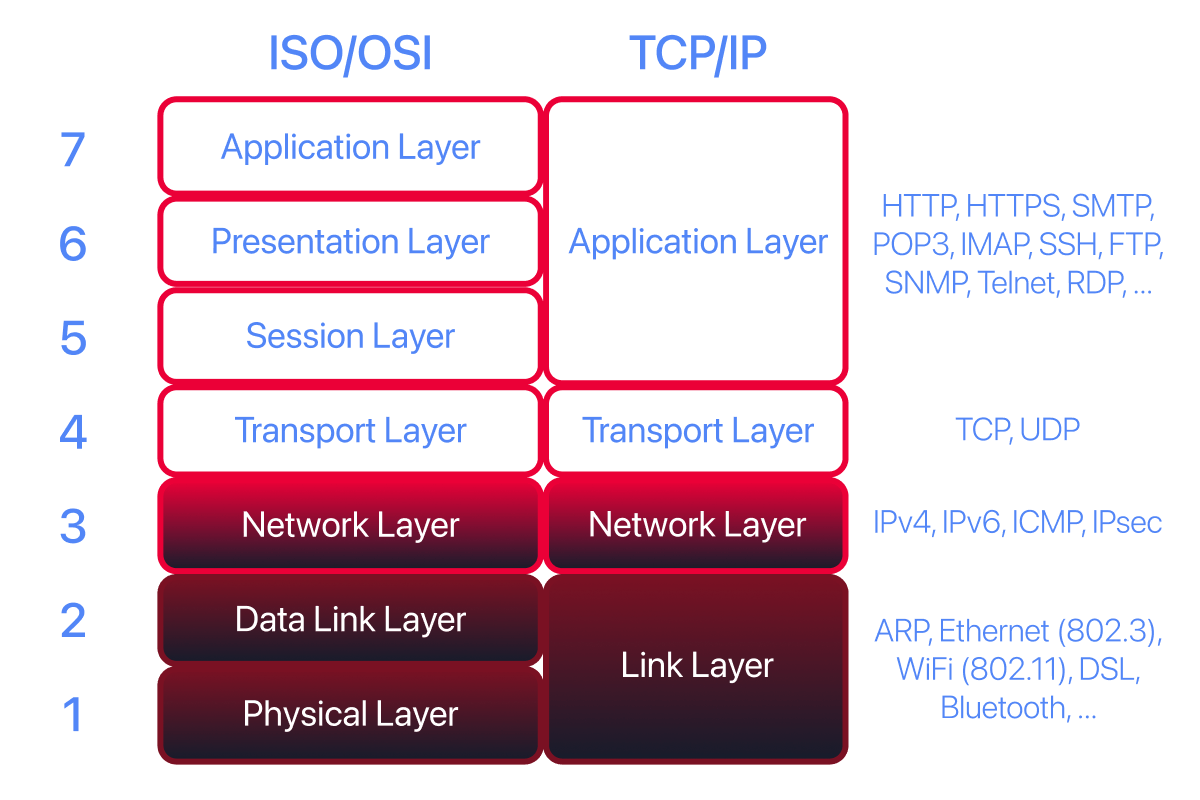
Before we discuss how each scanner can be used in detail, we will briefly review these four protocols. ARP has one purpose: sending a frame to the broadcast address on the network segment and asking the computer with a specific IP address to respond by providing its MAC (hardware) address.
ICMP has many types. ICMP ping uses Type 8 (Echo) and Type 0 (Echo Reply).
If you want to ping a system on the same subnet, an ARP query should precede the ICMP Echo.
Although TCP and UDP are transport-layer protocols, for network scanning, a scanner can send a specially crafted packet to common TCP or UDP ports to check whether the target responds. This method is efficient, especially when ICMP Echo is blocked.
If you have closed the network simulator, click on the “View Site” button in Task 2 to display it again.
New to the simulator? You aren’t one of the devices in the diagram; you direct the traffic from outside it. For each question, set the From, To, and Packet Type fields, plus Data when a question gives one, then send the packet. The network log lists every packet in the order it was sent, so read it from the top.